

Almost every Karachi household has faced this at least once: the K-Electric bill does not arrive, gets misplaced, or turns up after the due date. The good news is that you no longer need to visit a KE office or wait for a printed copy. You can get your KE duplicate bill online in a few minutes, using only your account number.
What you need before you start
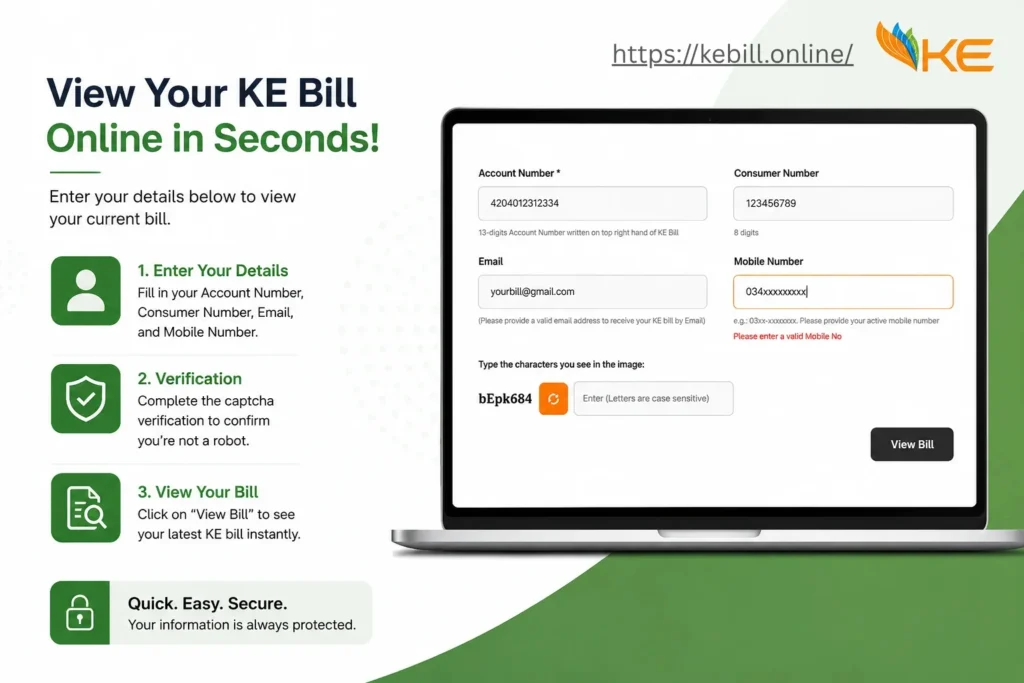
You only need one thing-your 13-digit account number. It is printed on any old K-Electric bill, usually near the top, and it stays the same every month. If you do not have an old bill, check an old payment receipt or a previous SMS from KE. Keep this number saved in your phone, because the same number is used for checking, downloading and paying the bill.
Step-by-step: check and download your bill
- Open a KE duplicate bill checker such as KE duplicate bill on your phone or computer.
- Enter your 13-digit account number carefully, with no spaces.
- Submit, and your current bill will appear on screen with the amount, due date and units consumed.
- Download the bill as a PDF or take a screenshot, so you have it even if the page is closed later.
That is the whole process. There is no registration, no password and no fee for viewing or downloading the duplicate copy.
Other official ways to get your bill
An online checker is the fastest option, but K-Electric offers other routes as well. You can request your bill on WhatsApp by messaging KE on 0348-0000118, receive bill details by SMS through 8119, or use the KE Live mobile app if you prefer an account-based view. These options are useful when you want a bill copy sent directly to your phone.
How to pay once you have the duplicate bill
A duplicate bill is valid for payment in exactly the same way as the original. You can pay through your bank app, Easypaisa, JazzCash, a bank branch or an ATM, using the account or consumer number shown on the bill. Always pay before the due date printed on the duplicate copy-the due date does not change just because you downloaded the bill late.
Common problems and quick fixes
Bill not found: re-check the account number digit by digit. One wrong digit is the most common reason. Old bill showing: the new month’s bill may not be issued yet. Wait a day and try again near your usual billing date. Amount looks wrong: compare the units and reading dates with last month before paying, and contact KE if the reading does not match your meter.
Final word
A lost paper bill is no longer a problem in Karachi. With your account number saved, you can check your KE bill online any time, download the PDF, and pay it before the due date-all in less time than it takes to find the original bill in a drawer.