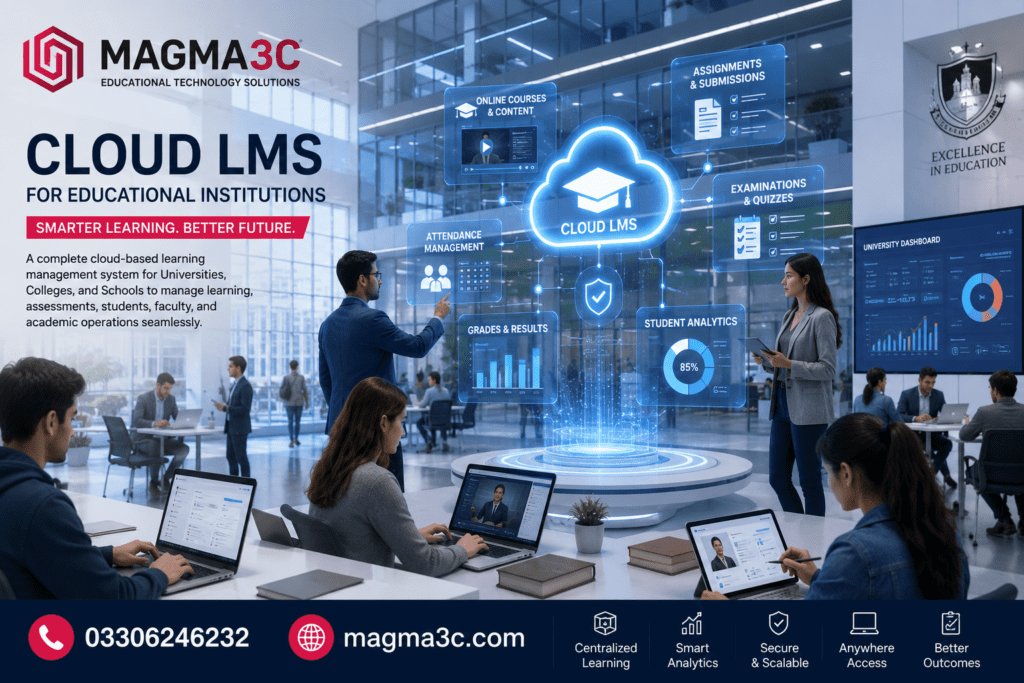

Education is no longer limited to the classroom, and institutions need more than a platform for uploading lecture notes. A modern Cloud LMS for Educational Institutions can bring courses, students, teachers, assessments, assignments, communication, and academic reporting into one connected environment.
Whether you manage a university, college, school, training institute, or elementary school, a cloud-based LMS can make learning easier to manage and more accessible.
Instead of maintaining complex servers and separate academic systems, institutions can use a centralized platform that students and teachers can access through the internet.
The real question is not whether an institution needs an LMS. It is which cloud LMS can support its current needs while remaining flexible enough for future growth?
What Is a Cloud LMS for Educational Institutions?
A Cloud LMS for Educational Institutions is a learning management system hosted on cloud infrastructure rather than being dependent entirely on servers maintained inside the institution.
Students, teachers, administrators, and other authorized users can access the platform through a web browser or compatible mobile application.
A typical cloud-based LMS can bring together:
- Course and subject management
- Student profiles
- Teacher and instructor accounts
- Online lectures and learning resources
- Assignments and submissions
- Online examinations
- MCQ and other assessment types
- Grades and results
- Attendance management
- Notifications
- Discussion and communication tools
- Academic reports
- User and role management
This centralized approach can reduce administrative work while giving students a single place to manage their learning activities.
Why Educational Institutions Are Moving to Cloud-Based LMS Platforms
Traditional learning environments can become difficult to manage when an institution has hundreds or thousands of students.
Teachers may use one system for assignments, another for communication, and separate tools for examinations and results. Students then have to remember multiple platforms.
A Cloud-based LMS brings these activities into one environment.
Easier Access for Students and Teachers
Cloud platforms can be accessed from different locations, provided users have an internet connection and appropriate credentials.
This is particularly useful for:
- Universities
- Colleges
- Schools
- Training institutes
- Distance learning programs
- Hybrid education programs
Students can access course materials without depending entirely on a physical computer lab or campus network.
Lower Infrastructure Complexity
With a cloud deployment, institutions do not necessarily need to manage every aspect of physical server infrastructure themselves.
The institution can focus more on academic operations while the technical environment is managed according to the selected cloud architecture and service model.
Easier Scalability
An LMS should not become a problem when enrollment increases.
A well-designed cloud platform can be structured to support expansion from a smaller institution to a larger academic environment.
This makes scalability an important factor when evaluating the best cloud LMS for educational institutions.
Key Features to Look for in a Cloud LMS for Educational Institutions
Not every LMS is designed for the same type of institution. A university may require considerably more academic and administrative functionality than a small school.
Before choosing a platform, evaluate the following features.
Course and Learning Management
The foundation of an LMS is course management.
Teachers should be able to organize learning resources into structured courses, subjects, modules, or lessons.
A useful course system can support:
- Video lectures
- PDFs and documents
- Presentations
- Reading material
- Assignments
- Quizzes
- Discussion activities
- Learning resources
- Course announcements
This creates a more organized learning journey for students.
Student and User Management
A large educational institution needs more than basic user accounts.
Administrators may need to manage:
- Students
- Teachers
- Departments
- Programs
- Classes
- Batches
- Sections
- Academic sessions
- Roles and permissions
Role-based access is particularly important because a student should not have the same access as an instructor or administrator.
Online Exams and Assessments
Online assessment is one of the most valuable LMS functions.
Institutions can use an LMS to create quizzes, tests, assignments, and examinations.
Useful capabilities may include:
- Multiple-choice questions
- True/false questions
- Question banks
- Timed assessments
- Automatic grading
- Manual grading
- Result reports
- Attempt management
- Grade calculations
For institutions that conduct frequent examinations, assessment management can save significant administrative time.
Attendance Management
Attendance can also be integrated into an LMS environment.
Depending on the platform’s design, institutions may track attendance by:
- Course
- Class
- Student
- Teacher
- Date
- Semester
- Session
This gives administrators a centralized view of student participation.
Learning Analytics and Reports
An effective LMS should not only store information. It should help institutions understand it.
Learning analytics can provide insights into:
- Course participation
- Assignment completion
- Assessment performance
- Student progress
- Attendance
- Course activity
- Academic results
These insights can help teachers identify students who may need additional academic support.
Cloud LMS for Educational Institutions: What About Schools and Elementary Schools?
An LMS is not only for universities.
The requirements of LMS for elementary schools can be different from those of higher education.
For younger learners, simplicity and usability become especially important.
A school-focused LMS may need:
- Simple dashboards
- Easy course navigation
- Parent communication
- Teacher announcements
- Homework management
- Online quizzes
- Attendance
- Learning resources
- Progress tracking
The interface should avoid unnecessary complexity so students and teachers can quickly find what they need.
For older students, institutions may introduce more advanced assessments, academic reporting, digital assignments, and collaborative learning tools.
Learning Management System Examples and Popular Platforms
When researching learning management system examples, educational institutions will come across different platforms with different approaches.
Common LMS categories include:
Open-Source LMS Platforms
Open-source platforms can provide flexibility and customization.
They may be suitable for organizations that want greater control over functionality, hosting, integrations, and system configuration.
Commercial Cloud LMS Platforms
Commercial platforms typically provide hosted environments with predefined features and support options.
They can be attractive to institutions that want a ready-to-use service without managing every technical component themselves.
Custom-Built LMS Platforms
A custom LMS is designed around the institution’s specific workflows.
This approach can be useful when an organization requires features that do not fit neatly into an existing platform.
For example, an institution may need custom semester management, examination workflows, multi-campus administration, specialized reporting, or integration with existing student systems.
MAGMA3C — Custom Web & LMS Development
Cloud LMS for Educational Institutions Review: What Should You Evaluate?
Searching for a Cloud LMS for Educational Institutions review can help, but reviews alone should not determine your decision.
Two institutions can use the same LMS and have completely different experiences because their requirements are different.
Before selecting a platform, evaluate:
1. Ease of Use
Can students understand the dashboard quickly?
Can teachers create courses and assignments without extensive technical training?
2. Scalability
Can the platform support your expected number of students, teachers, courses, and assessments?
3. Security
Look for proper authentication, permissions, backups, secure connections, and controlled access to academic information.
4. Mobile Accessibility
Students increasingly use smartphones and tablets for learning.
A responsive LMS can make educational content easier to access across devices.
5. Integration
Your LMS may need to connect with:
- Student information systems
- Payment systems
- Email platforms
- Video conferencing
- Authentication systems
- APIs
- Reporting tools
6. Support and Maintenance
Technical support matters, especially during examinations and enrollment periods.
An LMS should have a clear process for troubleshooting, maintenance, updates, and system monitoring.
Can You Download a Cloud LMS?
One common search is Cloud LMS for Educational Institutions download.
However, cloud LMS platforms are generally accessed through the internet rather than functioning like a traditional desktop application that you simply download and install.
There are different deployment models.
Cloud-hosted LMS:
The system runs on cloud infrastructure and users access it online.
Self-hosted LMS:
The institution manages hosting and deployment on its own infrastructure or selected hosting provider.
Custom cloud LMS:
A customized platform can be developed and deployed specifically for an institution’s requirements.
The right choice depends on the institution’s technical resources, budget, security requirements, customization needs, and long-term strategy.
Canvas LMS Examples: What Can Institutions Learn?
Canvas LMS examples are often useful when institutions are researching how modern LMS platforms organize digital education.
Platforms such as Canvas demonstrate the importance of structured course spaces, assignments, assessments, grades, communication, and learning resources.
However, institutions should avoid choosing an LMS simply because it is popular.
A better approach is to create a requirements checklist first.
Ask:
What does our institution actually need the LMS to do?
For example, a university may require:
- Multiple faculties
- Departments
- Programs
- Semesters
- Course enrollment
- Teacher assignment
- Online examinations
- Grade management
- Attendance
- Student dashboards
- Academic reporting
- API integrations
The platform should be selected around those requirements.
How a Cloud LMS Improves the Student Experience
The strongest LMS is not necessarily the one with the longest feature list.
It is the one students can actually use comfortably.
A well-designed LMS can provide students with a single dashboard showing:
- Enrolled courses
- Upcoming assignments
- Examination schedules
- Grades
- Announcements
- Learning resources
- Attendance
- Progress
Instead of searching through emails, messaging apps, and different websites, students can have one central academic workspace.
That simplicity can improve engagement and reduce confusion.
How Teachers Benefit From a Cloud LMS
Teachers also gain significant advantages.
Instead of manually maintaining separate spreadsheets and document folders, instructors can manage learning activities through the LMS.
They can create course material, publish assignments, evaluate submissions, conduct assessments, and monitor student progress.
A good LMS can also reduce repetitive administrative tasks.
That gives teachers more time to focus on what matters most: teaching and supporting students.
Cloud LMS vs Traditional Learning Management
| Feature | Cloud LMS | Traditional/Local LMS |
|---|---|---|
| Remote access | Yes | Depends on setup |
| Infrastructure | Cloud-based | Institution-managed |
| Scalability | Generally flexible | Depends on hardware |
| Maintenance | Reduced infrastructure burden | More internal responsibility |
| Mobile access | Usually available | Depends on implementation |
| Updates | Often centrally managed | Institution-dependent |
| Multi-location access | Strong fit | Requires additional setup |
The best option depends on institutional requirements rather than simply choosing the newest technology.
How to Choose the Best Cloud LMS for Educational Institutions
A practical selection process can be divided into five steps.
Step 1: Define Your Users
Identify students, teachers, administrators, parents, and other users who will access the system.
Step 2: Map Academic Workflows
Document how your institution currently handles:
- Admissions
- Course enrollment
- Teaching
- Assignments
- Attendance
- Exams
- Grading
- Results
Step 3: Identify Required Integrations
Determine which existing systems need to communicate with the LMS.
Step 4: Compare Deployment Options
Decide whether a hosted, self-hosted, or custom cloud solution is most appropriate.
Step 5: Plan for Growth
Do not build only for today’s student population.
Choose an architecture that can support future courses, campuses, users, and digital services.
Key Takeaways
- A Cloud LMS for Educational Institutions centralizes digital learning and academic activities.
- Cloud deployment can simplify infrastructure management and support remote access.
- Important features include course management, assessments, attendance, grading, reporting, and user management.
- LMS requirements differ between universities, colleges, schools, and elementary schools.
- Popular LMS examples can provide useful ideas, but institutions should select technology based on their own requirements.
- Custom LMS development can be valuable when standard platforms cannot support specialized academic workflows.
- Security, scalability, mobile accessibility, integrations, and technical support should be part of the selection process.
Frequently Asked Questions
What is a Cloud LMS for Educational Institutions?
A cloud LMS is an online learning management system hosted on cloud infrastructure. It allows students, teachers, and administrators to access courses, assignments, assessments, grades, and other learning resources through the internet.
What are the benefits of a cloud-based LMS?
The main benefits include remote accessibility, centralized learning management, scalability, easier administration, mobile access, and reduced dependence on institution-managed physical infrastructure.
Can a cloud LMS be used by schools and elementary schools?
Yes. LMS platforms can be adapted for schools and elementary education. Younger students may benefit from simpler dashboards, digital homework, quizzes, teacher communication, attendance, and progress tracking.
Is Canvas an example of a cloud LMS?
Canvas is an example of a modern learning management platform used by educational organizations. Institutions should compare its capabilities and deployment model with their own academic and technical requirements.
Should a university choose a ready-made or custom LMS?
It depends on the institution. A ready-made LMS may be suitable when standard features meet the requirements. A custom LMS can be a better option when the institution needs specialized workflows, integrations, examination systems, multi-campus functionality, or custom reporting.
Build a Smarter Digital Learning Environment
A modern educational institution needs more than an online place to upload PDFs. It needs a connected digital environment where students, teachers, administrators, courses, assessments, and academic data work together.
A well-planned Cloud LMS for Educational Institutions can provide that foundation while giving institutions the flexibility to expand their digital learning capabilities over time.
If your institution needs a customized LMS rather than a one-size-fits-all platform, the right development partner can help turn your academic workflows into a scalable digital learning system.
Explore MAGMA3C and discuss your LMS requirements with a professional development team.
Contact Us
Website: magma3c.com
Email: [email protected]
WhatsApp: 03306246232
For More Latest Articles Visit here