
A shop homepage has only a small space to introduce the people, atmosphere and work behind a business. A photograph can show all three. Adding one gentle movement can turn that scene into a short welcome: a florist turns toward the visitor, still holding the bouquet she was preparing.
For this example, I used Kling 3.0 to animate a new photographic-style flower-shop image. The result was a five-second video showing a restrained turn and a final glance toward the camera. Here is the workflow and the finished result.
Start with a photo that already tells the shop’s story
Choose a scene that makes sense before anything moves. A florist holding flowers, a baker beside a finished tray or a maker standing at a workbench gives the viewer an immediate subject and setting. Five seconds leaves little room to introduce a person, explain a task and change locations.
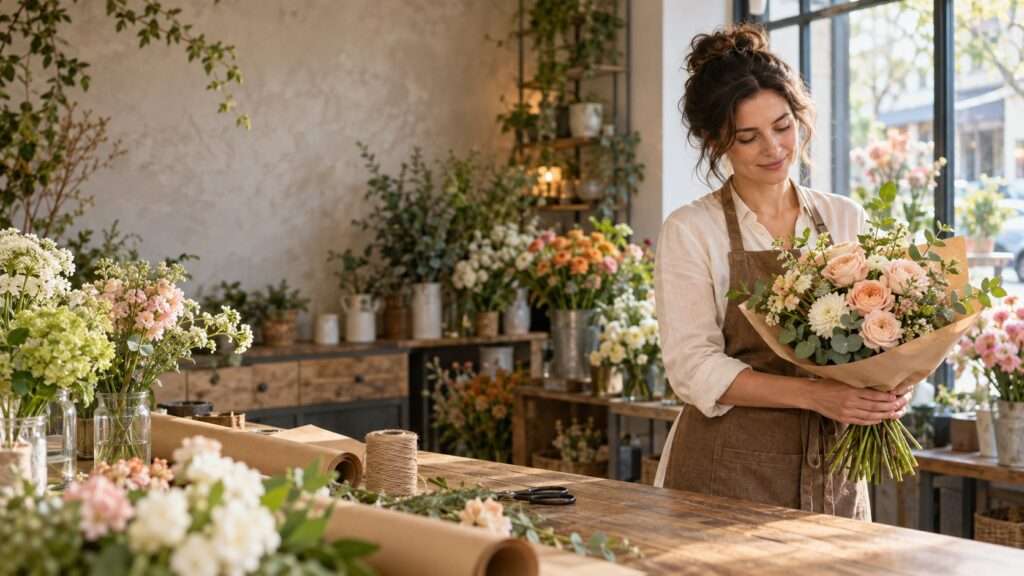
My reference placed the florist on the right, with a wooden wrapping counter across the foreground. Vases, grouped flowers, kraft paper and daylight established the shop around her. Her head, both hands and the complete bouquet were visible. The left side was quieter, while still showing enough of the room to feel like a working space.
That composition provided a useful starting point for a wide homepage visual. When preparing your own image, leave room around the person and the object they hold. A hand or bouquet already touching the edge gives the animation less space to move.
Give the scene one clear movement
The movement should reinforce what visitors already understand from the picture. For this scene, I chose a small upper-body turn while the florist continued supporting the bouquet. I did not ask her to wrap the flowers, cut stems and hand them to a customer within the same shot.
The room establishes the setting, the bouquet shows the service, and the turn adds a brief greeting. One action gives this short clip a clear focus.
Set up the image-to-video workflow
I opened the Image To Video workflow in Kling 3.0 and uploaded the reference as the Start Frame. I selected Standard (Std), set Video Duration to 5s and left Generate Sound off. I did not add an End Frame.
The duration and sound controls set up a short, silent clip in the same form. The reference established the scene, leaving the prompt to describe movement and framing.
There was no separate aspect-ratio control in the image-to-video form I used. I prepared a wide reference beforehand instead of relying on a ratio setting later. The actual input measured 1672 × 941 pixels.
Describe the action and what should stay visible
I submitted a prompt describing the turn, framing and shop details. The version below is adapted from that prompt for reuse:
“text Use the uploaded photograph-style florist shop image as the start frame. In one continuous five-second shot, the adult florist gently turns her upper body about 15 degrees toward the camera while both hands keep supporting the same pale peach and cream bouquet, then holds the pose. Keep the complete bouquet, both hands, head and face visible throughout. Use a completely locked camera: no orbit, pan, zoom, push-in, reframing, cuts or transitions. Preserve the wooden wrapping counter, glass vases, grouped flowers, kraft paper, scissors, twine and soft natural shop daylight. Background movement is quiet and subtle. No tying, cutting, changing hands, extra gestures, text or logos. “
The key instructions are one action, continued support of the bouquet and keeping the face and hands in frame.
For another shop scene, replace the subject and action while keeping the framing requirements specific.
Review the welcome moment in the finished clip
The downloaded MP4 measured 1280 × 720 pixels and lasted approximately 5.04 seconds, with no audio track. In the inspected frames, the florist continued holding the bouquet as she turned. Around the fourth second, she raised her gaze toward the camera, ending in a welcoming pose.
The shop remained recognizable, and her face, hands and bouquet stayed in frame. The turn also brought more kraft paper in front of the flowers. Fine flower and finger details varied, and there was slight background drift. I would use this result to convey the atmosphere of a flower shop rather than demonstrate the exact contents of a bouquet for sale.
Choose how the homepage will present it
For this particular clip, I would start with a visitor-controlled welcome video beside a short introduction and a contact or booking button. The ending pose differs from the opening pose, so repeating the file directly would create a visible reset.
Before adding it to a live site, check the video in the actual homepage layout, especially where a mobile crop might remove the hands or bouquet. Keep the business name and essential information as separate page text, and provide a still image for visitors who do not play the clip.
A shop photo, one purposeful movement and a suitable page placement can form a focused introduction. In this case, the florist and her flowers provide a brief welcome without needing a longer sequence.